
Audio conversion perfected, effortlessly convert between formats. dBpoweramp contains a multitude of audio tools in one: CD Ripper, Music Converter, Batch Converter, ID Tag Editor and Windows audio shell enhancements. Preloaded with essential codecs (mp3, wave, FLAC, m4a, Apple Lossless, AIFF), additional codecs can be installed from [Codec Central], as well as Utility Codecs which perform actions on audio files. After 21 days the trial will end, reverting to dBpoweramp Free edition. dBpoweramp is compatible with Windows 10, 8, 7, Vista, both 32 and 64 bit.

dBpoweramp Music Converter features:
• Convert audio files with elegant simplicity. mp3, mp4, m4a (iTunes / iPod), Windows Media Audio (WMA), Ogg Vorbis, AAC, Monkeys Audio, FLAC, Apple Lossless (ALAC) to name a few!
• Multi CPU Encoding Support
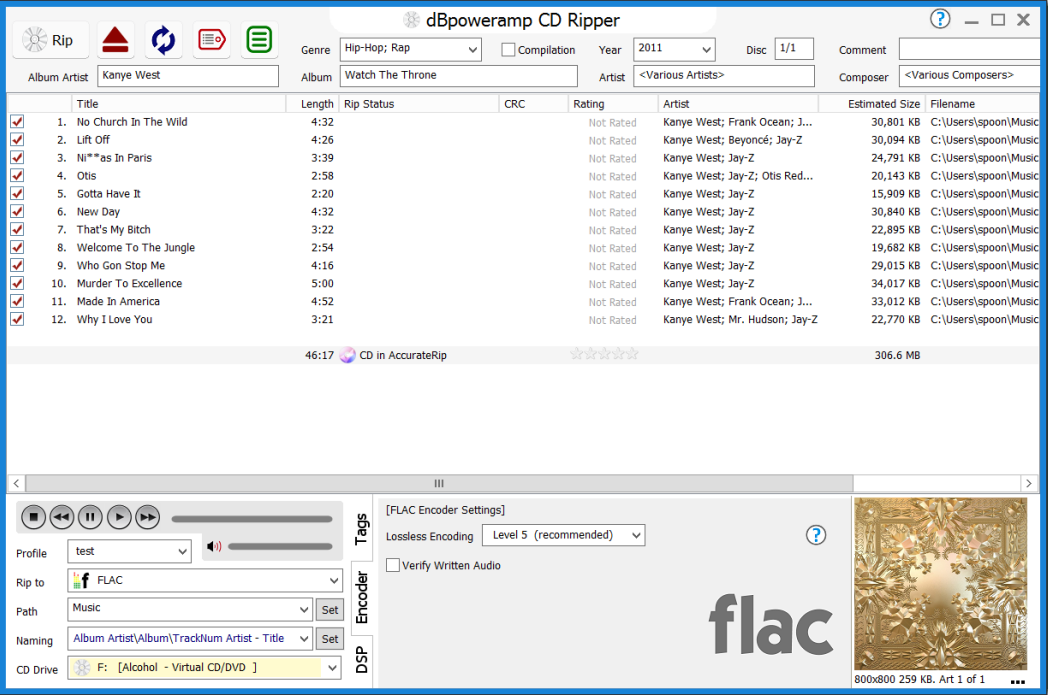
• Rip digitally record audio CDs (with CD Ripper)
• Batch Convert large numbers of files with 1 click
• Windows Integration popup info tips, audio properties, columns, edit ID-Tags
• DSP Effects such as Volume Normalize, or Graphic EQ [Power Pack Option]
• Command Line Encoding: invoke the encoder from the command line
• DSP Effects - process the audio with Volume Normalize, or Sample / Bit Rate Conversion, with over 30 effects dBpoweramp is a fully featured mp3 Converter
• dBpoweramp integrates into Windows Explorer, an mp3 converter that is as simple as right clicking on the source file >> Convert To. Popup info tips, Edit ID-Tags are all provided.

dBpoweramp Music Converter 17.3 changes:
★ New Low Pass filter code, does not attenuate lower frequencies
★ New DSP effects: High pass, and Bandpass filters
★ wavpack updated to 5.4.0
★ CD Ripper: Added Catalog # to the new tags list. Also sorted the list.
★ CD Ripper: Added secure option to mark track as error 'if not verified by accuraterip'
★ CD Ripper: filename column - if multi encoder then says for each track {multi- encoder cannot show filename}
★ CD Ripper: will show error if try to use Multi Encoder with '[sourcexxx]' naming elements
★ ID Tag Processing DSP: 'delete all' and 'all except' actions are removed for naming processing
★ Tag editor when choosing art from internet, if does not have album title then track name is used instead
★ Multi Encoder: removes the 'As Source' naming options multi-encoder naming selection
★ ID3v2 tags: updated itunes compilation field handling, supports multi-value TLAN + TPUB
★ APEv2 tag: properly remove multiple album art entries

Fixes:
♦ Bug fix: property handler and thumbnail provider would not read the tag if in process tag reading was checked
♦ Bug fix: Choosing After Conversion >> 'shutdown / hibernate / etc' would not happen unless 'skip finish' as also selected
♦ Bug fix: can write DSD tags when ripping to ._ files
♦ Bug fix: CD Ripper: ID Tag processing DSP effect was not being used to pre- process the ID Tags when creating filenames with [Multi Encoder]
♦ Bug fix: Music Converter: ID Tag processing was not being used for Multi- encoder
1. dBPowerAMP
or
2. dBPowerAMP
or
3. dBPowerAMP


6 comments:
I found this Music Converter I think it's the best one. I was able to do audio conversion easily and the audio quality is awesome !
I found this Music Converter I think it's the best one. I was able to do audio conversion easily and the audio quality is awesome !
Thank you Chris.
I have used this for years. It's the best.
My computer crashed last week and I thought it was lost for good.
Lucky me I found one of the links here still to be working.
I had the same prob as Epeb and none of the links are working ... dang. lol.
All links are dead :( Would you please re-upload? Thanks so much!
Hi. I have added "dBPowerAMP Music Converter™" later than this version.
//ChrisGoesRock
Post a Comment